Introduction
Email looks simple until you try to do it properly. Once you mix Cloudflare DNS, Google Workspace, and a modern email provider like Resend, things can quietly break, sometimes without errors.
This article documents a real production issue: emails returning success in code, but never appearing in the Resend dashboard or inbox.
If you're using Next.js, Cloudflare, Google Workspace, and Resend, this guide will save you hours.
The Target Architecture
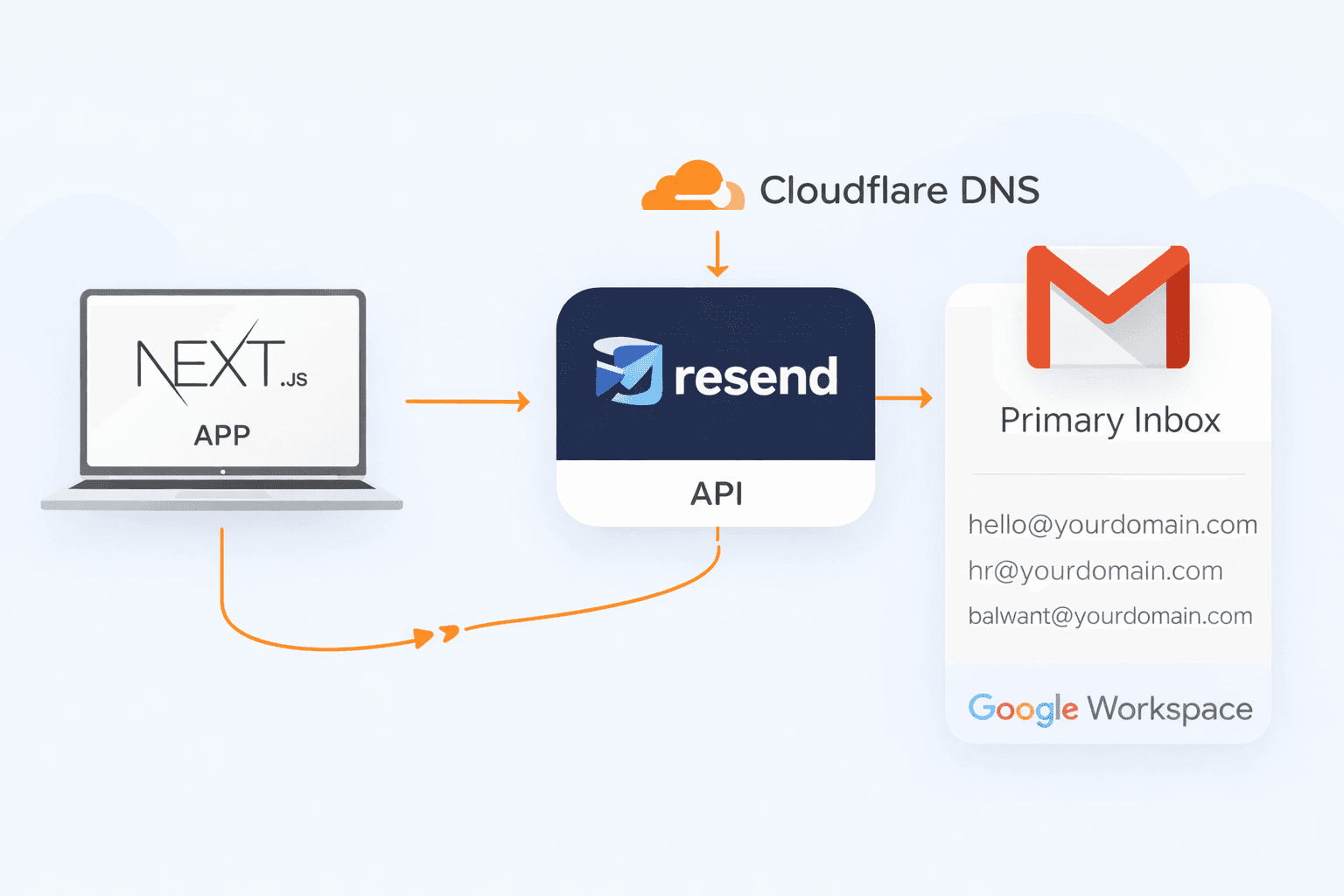
Before touching code, it's important to understand the correct mental model. This setup works cleanly and predictably:
- Cloudflare → DNS & CDN only
- Google Workspace → inbox & aliases
- Resend → transactional email sender (API)
- Next.js → application logic
No SMTP servers. No email routing hacks. Just API-first email delivery.
Google Workspace: Inbox, Not a Sender
Google Workspace should only handle incoming mail. Create a primary inbox like:
Then add aliases:
These aliases do not need separate inboxes. All emails land in the primary mailbox automatically.
Cloudflare DNS: What You Actually Need
Cloudflare should only manage DNS records. Email routing must be disabled.
Required records:
- Google Workspace MX records
- Resend DKIM record
- A single merged SPF record
v=spf1 include:_spf.google.com include:_spf.resend.com ~all
Anything related to send.yourdomain.com or SMTP
is unnecessary if you're using the Resend API.
The Common Mistake: Nodemailer + SMTP
This is where most setups go wrong. Many developers start with Nodemailer and SMTP because it's familiar.
nodemailer.createTransport({
  host: process.env.RESEND_HOST,
  port: 465,
  secure: true,
});
The problem? Resend is API-first, not SMTP-first. Mixing SMTP with API-based DNS configuration leads to silent failures.
Emails may return success in code,
but never appear in the Resend dashboard.
The Real Bug: Unverified From Address
Another subtle issue is the from address.
This will fail silently:
from: "[email protected]"
Why?
Because send.yourdomain.com is not a verified sending domain.
Resend only allows sending from domains you explicitly verified.
The Correct Way: Resend API
The fix is simple: stop using SMTP and use the Resend API directly.
import { Resend } from 'resend';
const resend = new Resend(process.env.RESEND_API_KEY);
await resend.emails.send({
from: 'Your App ',
to: ['[email protected]'],
subject: 'New Contact Form Submission',
html: 'Hello from Resend
',
});
Once the from domain matches the verified domain,
emails immediately appear in the Resend dashboard
and arrive in Gmail.
Why This Works So Well
- No SMTP credentials to rotate
- Fewer DNS records
- Better deliverability
- Clear logs and visibility
- Perfect for serverless platforms like Vercel
Final Email Flow
The final system looks like this:
Next.js App
   ↓
Resend API
   ↓
From: [email protected]
   ↓
Google Workspace
   ↓
Primary Inbox
Key Takeaways
- Do not mix SMTP with Resend API
- Cloudflare should only handle DNS
- Google Workspace is for inboxes, not sending
- Always send from a verified domain
Conclusion
Modern email infrastructure is simpler than it looks, but only if each tool does one job well.
Resend handles sending. Google Workspace handles inboxes. Cloudflare handles DNS.
Once you align your code with that model, email becomes boring again, in the best way possible.
If you're setting this up for a real product and need help, feel free to reach out.